
Technical SEO for Musicians: Site Speed & Mobile Optimization
In today’s music scene, it’s not enough to just have killer tracks or a compelling live show. Potential fans, venue owners, and industry professionals now check out your music online before deciding whether to listen, book, or collaborate.
Consequently, technical SEO – specifically site speed and mobile optimization – has become vital. A slow, clunky website can turn visitors away faster than a missed note in a live set.
This comprehensive guide delves into the world of technical SEO for musicians, focusing on how site speed and mobile-friendliness can directly influence your reach, reputation, and eventual success.
Why Site Speed and Mobile Optimization Matter for Musicians
Capturing Fans’ Limited Attention
Music lovers make snap judgments. If your website loads slowly, many visitors will abandon it for another band or streaming service. The same is true if your layout is not mobile-friendly; modern audiences often search for new acts on their phones, so a poor experience can cost you a potential fan—or even a gig inquiry.
Impact on Ranking and Visibility
Search engines like Google incorporate site speed and mobile performance into their algorithms. Even the best song samples, latest album announcements, and meticulously curated show schedules may remain undiscovered if your site’s performance lags behind.
Monetization and Bookings
Whether you’re selling merch, promoting your new single, or touting your upcoming gigs, slow or unresponsive pages directly impact conversions. Visitors who wait too long for a page to load are far less likely to complete a ticket purchase or fill out a booking request.
The Musician’s Guide to Technical SEO
Understanding Technical SEO
Technical SEO centers on the site components that aren’t purely content or backlink-driven. It ensures search engines can find, crawl, interpret, and rank your pages effectively. A strong technical foundation helps your genre-specific keywords, on-page content, and social media promotions deliver maximum results.
Key aspects include:
- Crawlability: Making sure bots can navigate your site.
- Indexability: Ensuring important pages show up in search results.
- Site Structure: Organized navigation and clean coding.
- Speed & Performance: Minimizing load times and server delays.
- Mobile Optimization: Delivering a seamless phone or tablet experience.
Defining Site Speed
Site speed refers to how quickly your pages load. For musicians, this includes pages with album art, embedded music players, and show photos.
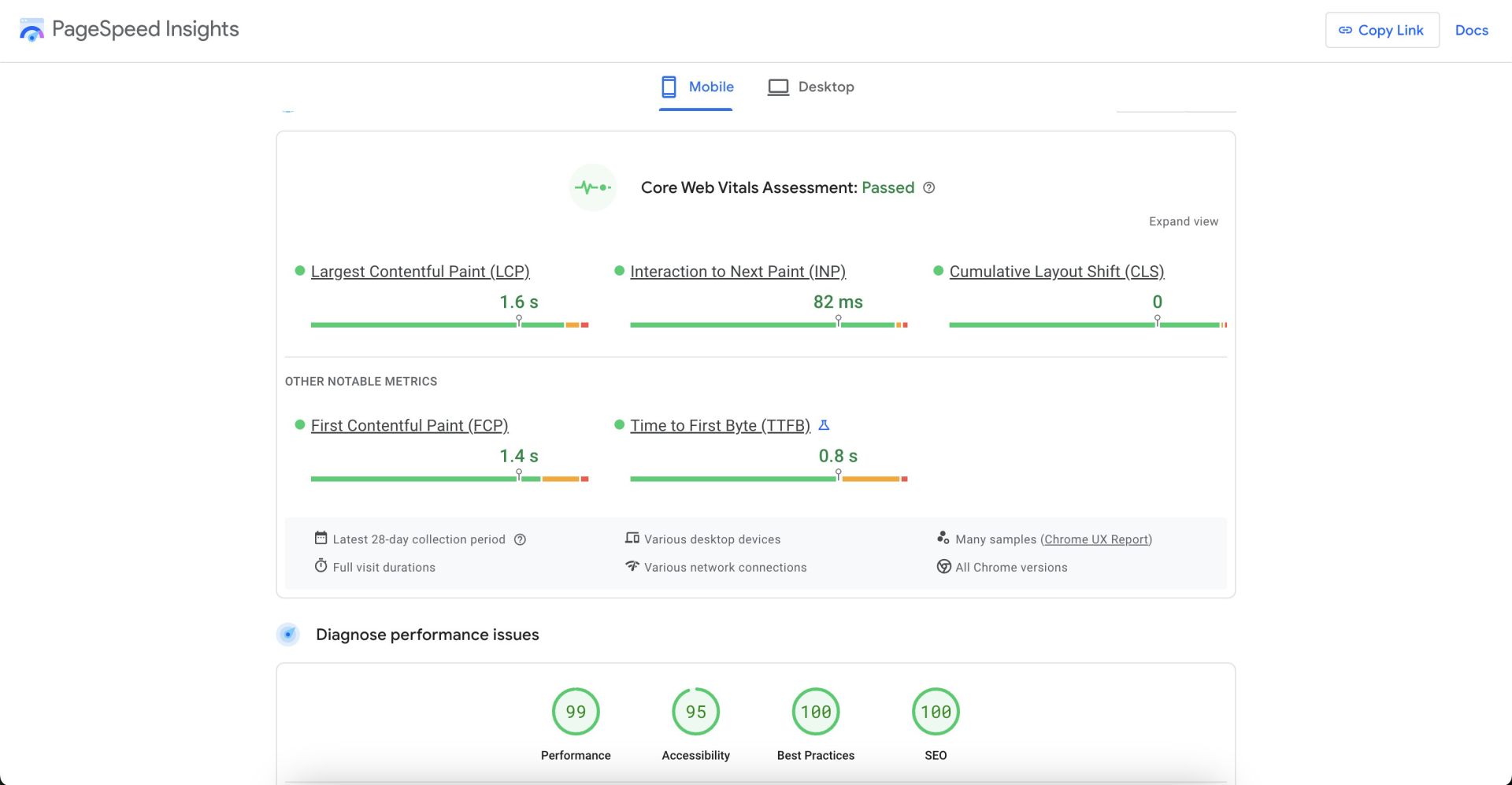
Core Web Vitals are Google’s measurement of user experience:
- Largest Contentful Paint (LCP): How quickly the main content loads.
- First Input Delay (FID): How soon the site responds after a user interacts.
- Cumulative Layout Shift (CLS): How stable the page is during load.
If your music site is riddled with uncompressed images of your band or large audio files playing automatically, you risk losing visitors during these vital first seconds.
Critical Site Speed Strategies
1. Optimize Images and Media
Compress your photos without sacrificing crucial quality:
- JPEG for Photos: Great for band pics and show images.
- PNG for Graphics: Best for logos or images with text/transparent backgrounds.
- WebP: A modern format offering better compression than JPEG or PNG.
Use TinyPNG to optimize your images
Lazy Loading: Defer loading below-the-fold images until the user scrolls, improving the initial page load speed.
Embedded Players: If your site auto-plays music or video, ensure those assets are either hosted efficiently or minimized. Overloading your homepage with auto-play media can hamper load times.
2. Minimize External Scripts and Plugins
Embedded social media feeds, chat widgets, or advanced third-party players can all add extra scripts that slow load times. Evaluate whether each plugin is truly vital to your site’s identity or just nice to have. Minimizing them can reduce load times significantly.
3. Enable Caching and a CDN
- Browser Caching: Let returning fans skip re-downloading the same site resources, speeding up their revisit.
- Content Delivery Network (CDN): Mirrors your site’s media files across global servers so visitors connect to a geographically closer server. This is especially useful for touring or international musicians who want fans around the world to load their site quickly.
4. Compress and Minify Code
Remove unnecessary spaces, comments, and line breaks from HTML, CSS, and JavaScript:
- Minify: Tools like Uglify, CSSNano, or built-in pipeline options in your CMS.
- GZIP or Brotli: Compress your site’s files so that the server sends smaller data to the browser.
5. Leverage Tools for Speed Insights
- Google PageSpeed Insights: Provides clear suggestions for improvement, focusing on real user data.
- GTmetrix or Pingdom: Show advanced breakdowns of what slows your site.
- Chrome DevTools: Inspect loading behavior, diagnosing large files or slow server requests.

Mobile Optimization Essentials for Musicians
1. Responsive Design vs. Mobile Version
Responsive design ensures your site automatically adjusts its layout to screens of different sizes. This approach is usually recommended over a separate “m.YourSite.com” version because:
- Unified Maintenance: A single site rather than juggling two codebases.
- Consistent Branding: The same design and content for all users, just scaled or rearranged for smaller screens.
2. Mobile-Specific Performance
Mobile devices often have slower connections and weaker processors. To serve them effectively:
- Avoid Heavy Effects: Parallax animations or large background videos can crush phone CPU.
- Adaptive Images: Use CSS or JavaScript to load smaller images for small displays.
- Mobile-First Approach: Start by designing a minimal phone version, then expand features for desktop.
3. Navigation and UI for Phone Users
Music fans checking your site on the go want quick info. This means:
- Simple Menus: Hamburger icons or short top-level links.
- Tap-Friendly Buttons: Enough spacing so a user can easily press them with a thumb.
- Immediate Access to Key Info: Possibly your next gig date, new album release link, or latest music video snippet.
4. Testing on Real Phones
Previewing your site in a desktop “mobile mode” is not foolproof. Check your site on actual iPhones, Androids, or tablets. Doing so ensures no hidden layout issues or awkward scrolling hamper user experience.
Additional Technical SEO Considerations
A. Structured Data for Musicians
Adding schema.org markup like MusicGroup, MusicEvent, or Album can yield improved search results. For example, if you host an event page, the code signals to Google the location, time, ticket info, and more. This can show up as a “rich snippet,” encouraging more clicks.
B. Robots.txt and Sitemaps
• Robots.txt: If you inadvertently block important band or album pages, your site’s presence in search can suffer. Keep it simple, only blocking pages you never want found (like a test page).
• XML Sitemaps: Ensure search engines can find all your pages quickly. Sitemap generation tools can auto-generate these.
C. HTTPS Security
Security is also a ranking factor. Especially if you run a store for merch or tickets, an SSL certificate (HTTPS) is mandatory to protect user data and avoid “not secure” browser warnings.
D. Handling Duplicate Content
If you have multiple versions of a release page, or if your band shares pages on different subdomains, canonical tags can unify the “authority” to one main URL. This prevents search engines from perceiving you as repeating or spamming the same content.
Putting It All Together: Technical SEO Roadmap for Musicians
1. Audit Your Current Setup
- Use PageSpeed Insights or GTmetrix.
- Check your site’s mobile-friendly score.
- Evaluate your structure: are important pages easy to reach from the homepage?
2. Optimize Speed
- Compress images (JPEG, PNG, WebP).
- Minimize and combine scripts or stylesheets.
- Implement caching or a CDN if possible.
3. Revamp Mobile Layout
- Ensure your site is responsive.
- Prioritize key details that fans look for: upcoming shows, music samples, or a link to your main streaming platform.
- Test on real devices (various OS versions and screen sizes).
4. Enhance Technical SEO Elements
- Check for broken links or 404 pages.
- Implement structured data for events or releases.
- Maintain consistent NAP info for local SEO if you want local gigs.
5. Monitor and Iterate
- Inspect logs and performance stats monthly.
- Revisit your site’s performance after each major update or new album release to keep fans—and Google—happy.
Frequently Asked Questions (FAQs)
Q: How fast should my music site load for good SEO?
A: Generally aim for under 3 seconds on both desktop and mobile. Google’s Core Web Vitals emphasize speed as a major factor in user satisfaction—and thus, search rank.
Q: Do I need separate pages for each album or single?
A: Yes, it can help. Each unique music release page can target relevant keywords (song or album name) and incorporate structured data. Just keep them optimized for speed with minimal heavy media.
Q: Is an auto-playing background track a bad idea for site speed?
A: Typically, yes. Auto-playing audio can drastically increase load times, especially on mobile data connections. It’s better to let fans choose to play your track or embed an external music player efficiently.
Q: What mobile SEO mistakes do musicians commonly make?
A: Overloading the homepage with high-res photos or embedded videos, ignoring menu readability, or forgetting to test real phone performance. Another is skipping a mobile-friendly design altogether, causing big bounce rates.
Q: Does using a free website builder hamper technical SEO?
A: Many site builders (like Wix, Weebly, or Squarespace) offer decent SEO features. However, you might face some limitations around code-level optimizations or advanced caching/CDN usage. Evaluate those features carefully.
Q: How frequently should I re-check my site speed?
A: Every few months or whenever you add new media or design changes. Tools like Google PageSpeed Insights track historical performance, so it’s easy to monitor changes over time.
Final Thoughts: Elevating Your Web Presence with Speed & Mobile Mastery
Stellar content or top-notch musicianship means little if fans can’t load your site or if the pages look broken on a phone. By embracing technical SEO tactics—especially around site speed and mobile optimization—you ensure your best tracks and upcoming gig info are found by an audience truly eager to engage.
Need Help?
If you want a deeper, professional approach to upgrading your site’s performance, design, or technical SEO, Order a Website Now from experts specializing in musician-friendly solutions. Let’s collaborate to amplify your reach, guaranteeing fans and industry professionals see your site at its fastest, brightest, and most device-friendly form. Then you can focus on your music, while your optimized site does the heavy lifting behind the scenes.